Prof. Dr. Wolfgang Georg Arlt
International Tourism Management


You are on www.arlt-lectures.com

Best viewed with Internet Explorer


1. Sem 8034: Soft Skills


Presentations techniques

The Top 10 effective presentation techniques (using a computer).
(based on: www.presentationhelper.co.uk)


1. Use visual aids

Using pictures in your presentations instead of words can double the chances of meeting your objectives.


2. Keep it short and sweet (KISS: Keep it simple and sexy)

There is an old adage that said - “No one ever complained of a presentation being too short.” Nothing kills a presentation more than going on too long.

There are some college professors who will penalise a short presentation (most lecturers see no problem in droning on) , but for most people a shorter presentation is better. Keep your presentation to under 22 minutes if you can.


3. Use the rule of three

A simple technique is that people tend to only remember three things. Work out what the three messages that you want your audience to take away and structure your presentation around them. Use a maximum of three points on a slide.


4. Rehearse

Practice makes for perfect performance. Many experts say that rehearsal is the biggest single thing that you can do to improve your performance. Perform your presentation out loud at least four times. One of these should be in front of a real scary audience. Family, friends or colleagues. Even the dog is better than nothing.


5. Tell stories

All presentations are a type of theatre. Tell stories and anecdotes to help illustrate points. It all helps to make your presentation more effective and memorable.


6. Lose the bullet points - don’t put your speaker notes up on the screen

Bullet points are the kiss of death for most presentations. Most people use bullet points as a form of speaker notes. To make your presentation more effective put your speaker notes in your notes and not up on the screen.


7. Video yourself

Set up a video camera and video yourself presenting. You will see all sorts of mistakes that you are making, from how you are standing, if you are jangling keys, to how well your presentation is structured.


8. Know what slide is coming next

You should always know when presenting which slide is coming up next. It sounds very powerful when you say “On the next slide [Click] you will see…”, rather than than a period of confusion when the next slide appears.


9. Have a back-up plan

Murphy’s law normally applies during a presentation. Technology not working, power cuts, projector blowing a bulb, spilling coffee on your front, not enough power leads, no loudspeakers, presentation displays strangely on the laptop - all of these are things that have happened in presentations that I have given.

Have a back-up plan. Take with you the following items - a printed out set of slides - (you can hold these up to the audience if you need to), a CD or data stick of your presentation, a laptop with your slides on it. Just in case it goes wrong.

Guess what? When you have back-ups - you seldom need to use them.


10. Check out the presentation room

Arrive early and check out the presentation room. If you can make sure that you see your slides loaded onto the PC and working on the screen. Work out where you will need to stand.


  More details on the top 3:

Use visual aids in your next presentation.

Why should you use visual aids?

1. How we take in information during a presentation

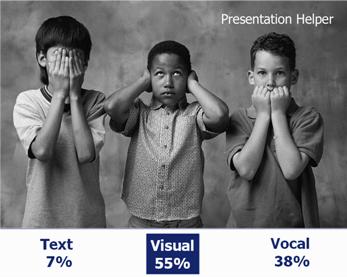
Professor Albert Mehrabian did a lot of research into how we take in information during a presentation. He concluded that 55% of the information we take in is visual and only 7% is text.

There are some important conclusions that we can take in from this information

  1. Use visuals (pictures, graphs, tables, props) whenever you can
  2. In a speech you are only using 38% of the communication medium
  3. Ditch the bullet points

2. Making the presentation memorable

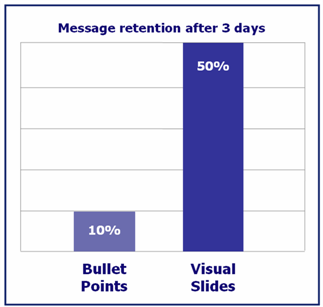
Bar Chart  Bullet points 10% Visuals 55%

In a Study at the Wharton Research Centre they showed that using visual slides had a dramatic effect on message retention.

The old adage that "a picture is worth a thousand words" is as true today as it has always been.

3. Achieving your objectives

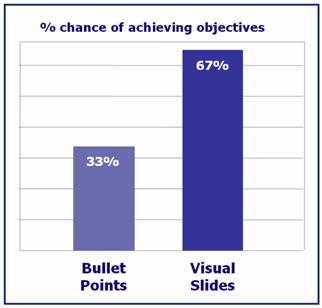
If I said that I could double your chances of achieving your objectives in a presentation with just one piece of advice you would probably be very skeptical. And yet if you use visual images that is just what happens.

This study by Decker Communications showed that by using visuals in your presentation you could expect roughly to double the chance of achieving your objectives. And if you are trying to make a sales presentation or a job interview presentation, this piece of advice could have a major impact on your bank balance.

The conclusion: Use visual aids

 Rehearse your presentation and it will get better.

Sorry to sound like a bit of an old nag. It's obvious - rehearsing - isn't it? But it's also a bit of a drag and one that is easy to forget. It is probably the most common mistake of all presentations that I have seen.

You wouldn't dream of going to see a Shakespeare play at the RSC only to find that they hadn't properly learnt the script. You wouldn't dream of going to the opera to hear the band play out of time because they hadn't got round to rehearsing properly. Yet in presentations and in speeches we see this happening all the time.

The impact of inadequate rehearsal on the audience

Rehearsing could make the difference between a good and an average presentation.

1. Plan to rehearse your presentation out loud at least 4 times.

We suggest that you should rehearse at least four times, and if you can get word perfect so much the better. I know that you haven't got the time, but we have seen so many presentations that have been let down due to a lack of rehearsal.

Make sure that one of your rehearsals is in front of a really scary audience - family, friends, partners, colleagues; children. They will tell you quite plainly where you are going wrong - as well as providing you with the support that you need.

2. Rehearse against the clock

If you have to give a presentation in a short period of time then try to practice your presentation against the clock. This is particularly true with something like the five minute job presentation. You can add in parts from the script or take them out to fit the time. Allow extra time in your presentation for questions and watch out for nerves - this could mean that you talk faster on the day.

In the actual presentation you could take in a clock or take off your wrist watch and put it on the podium. This way you can see how the timings can develop.

3. Take a leaf out of Winston Churchill's book - memorize your script.

He is widely attributed as being one of the great speakers. It took him six weeks to prepare his Maiden Speech in the House of Commons and he learnt it word perfect.

4. Video or tape record yourself

A very simple trick that could help you with your performance is to video or tape record yourself. This will give you some immediate feedback and will enable you to fine tune your performance

  Use the rule of three


This is one of the oldest of all the presentation techniques - known about since the time of Aristotle.

People tend to remember lists of three things. Structure your presentation around threes and it will become more memorable.

The Rule of Three - We remember three things.

The rule of three is one of the oldest in the book - Aristotle wrote about it in his book Rhetoric. Put simply it is that people tend to easily remember three things.

Remember as a kid when your mum sent you down to the shop to buy a number of things. But when you got to the shop all you could remember were three things. This is the rule of three

Odds are that people will only remember three things from your presentation

    What will they be?

1. The audience are likely to remember only three things from your presentation - plan in advance what these will be.

Believe it or not, the chances are, people will only remember three things from your presentation. So before you start writing your presentation, plan what your three key messages will be. Once you have these messages, structure the main part of your presentation around these three key themes and look at how they could be better illustrated.

2. There are three parts to your presentation

The beginning, the middle and the end. Start to plan out what you will do in these three parts. The beginning is ideal for an attention grabber or for an ice breaker. The end is great to wrap things up or to end with a grand finale.

3. Use lists of three wherever you can in your presentation

Lists of three have been used from early times up to the present day. They are particularly used by politicians and advertisers who know the value of using the rule of three to sell their ideas.

Veni, Vidi, Vici (I came, I saw, I conquered) - Julius Caesar
"Friends, Romans, Countrymen lend me your ears" - William Shakespeare
"Our priorities are Education, Education, Education" - Tony Blair
A Mars a day helps you to work, rest and play - Advertising slogan
Stop, look and listen - Public safety announcement

A classic example of the rule of three was Winston Churchill's famous Blood, Sweat and Tears speech. He is widely attributed as saying I can promise you nothing but blood sweat and tears. What he actually said was "I can promise you Blood, Sweat, Toil and Tears". Because of the rule of three we simply remember it as Blood sweat and tears.


  Contact: Prof. Dr. Wolfgang Georg Arlt FRGS
Bachelor and Master Program International Tourism Management
arlt@fh-westkueste.de, Office 2.018, Tel. 0481 8555-513
Consultation hours (during lecture period): Tuesday 16.00 - 17.00 h

home.gif